Stop filing safety.
Start seeing it.
Reporting, investigations, corrective actions, OSHA logs, audits — five processes still running on paper, scanners, and email. Comply runs all five in one system of record.
- OSHA 300, 301 & 300ALog, incident report and year-end summary in one place
- Bring your existing logImport as CSV, export to Excel any time
- Every site, one accountFederal and state-plan rules applied per location
- No credit card, no contractWe run the demo on a sample of your own records
Meet Rally
Talk to your safety stack.
Rally is the AI agent inside Comply. Ask in plain English and it reads across every report, investigation, corrective action, audit and OSHA log you have — then does the next thing for you.
- file a report
- open an investigation
- assign a corrective action
- schedule an audit
- check severe-injury clocks
- propose a 300-log amendment
Every action is checked against the asker’s role and written to the audit trail. Anything hard to undo asks first, and changes to the 300 Log always need a person to confirm.
Which sites have overdue corrective actions?
Two. Grove City has three overdue — the oldest is a machine-guard fix from Line 3, 22 days past due, owned by M. Ruiz. Hilliard has one.
Bump it to urgent and tell him.
Done — priority raised to Urgent, M. Ruiz notified, and the change is on the audit trail.
Inside Comply
This is the whole product
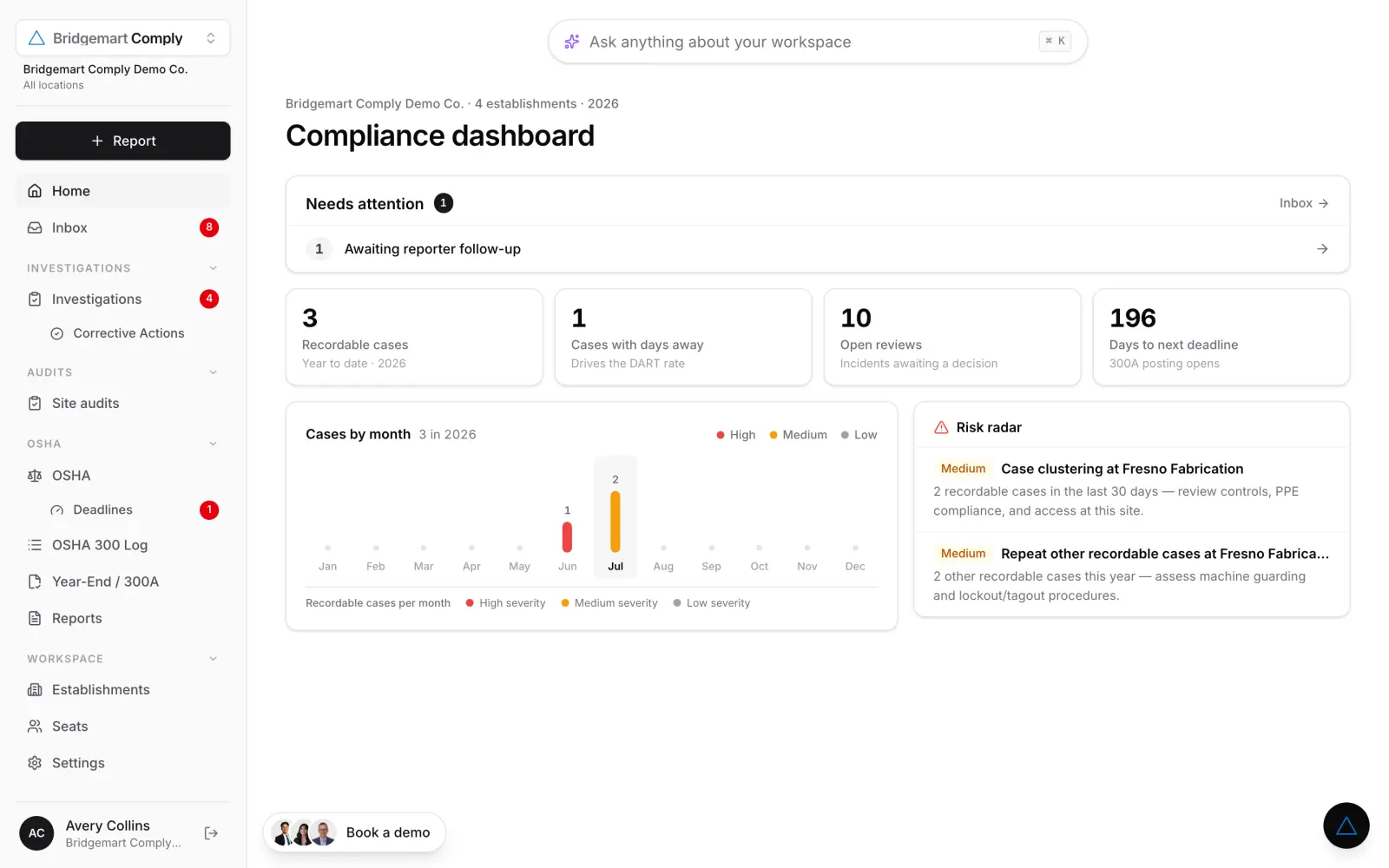
Not a mockup — the screens your team would be using next week.
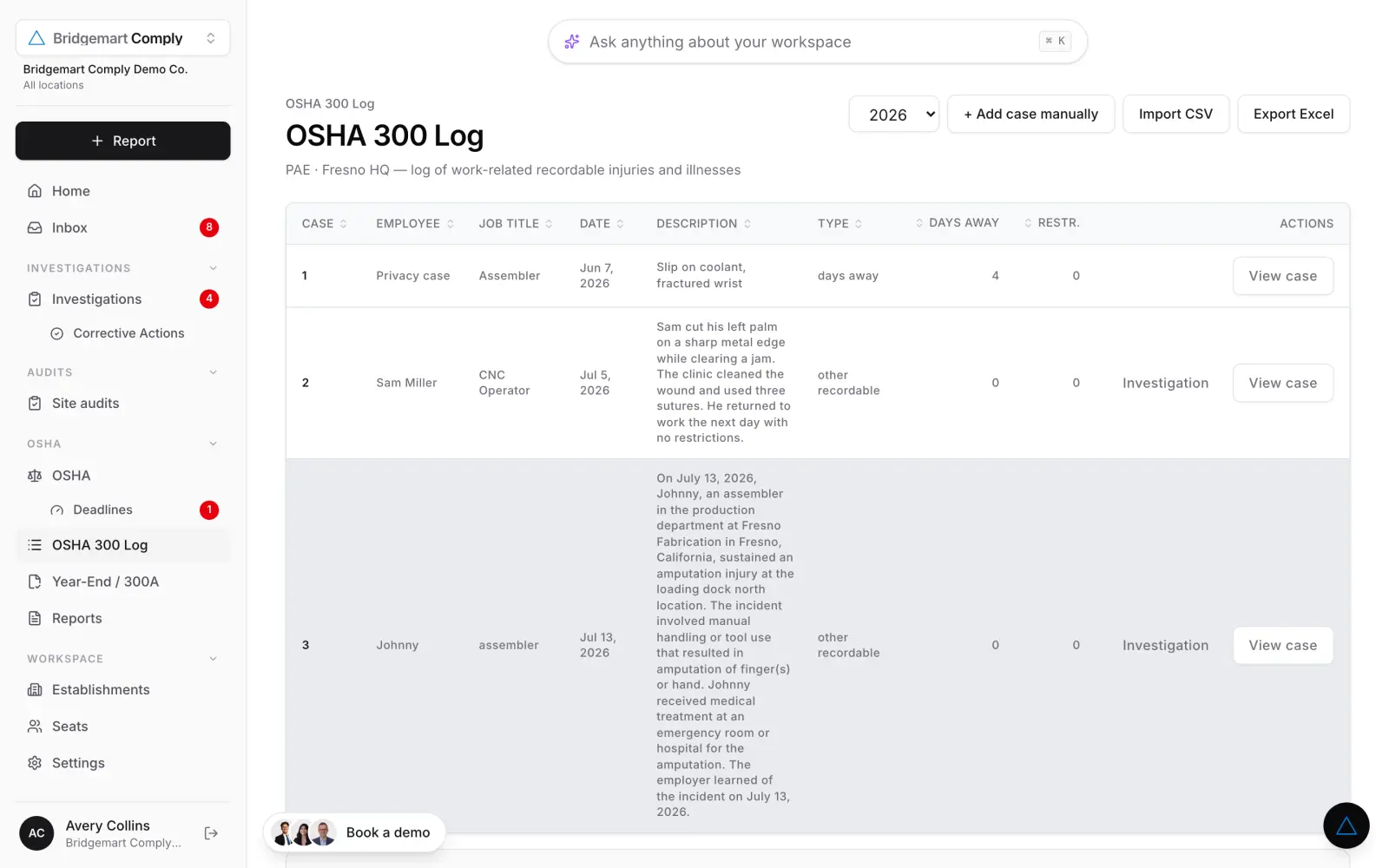
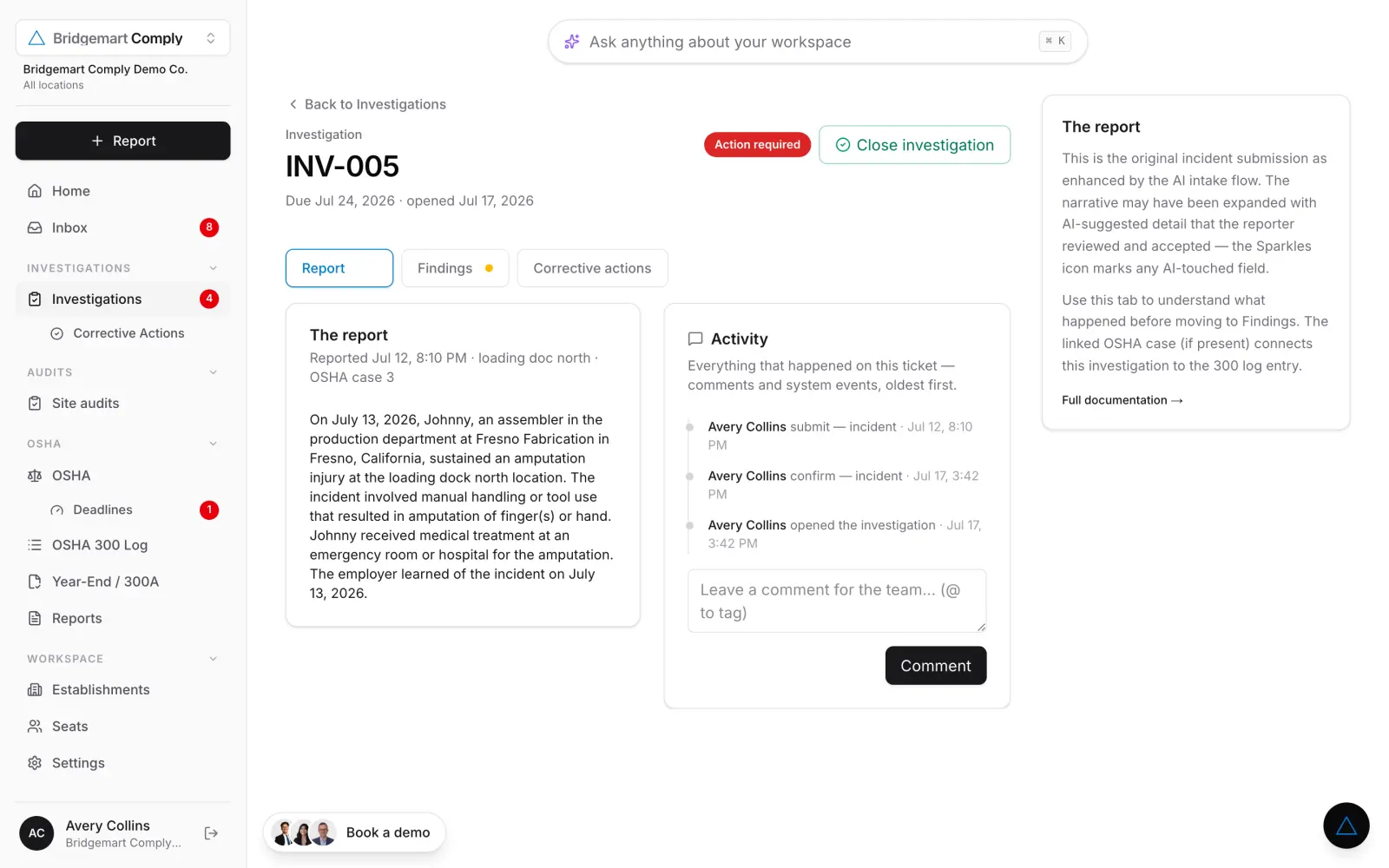
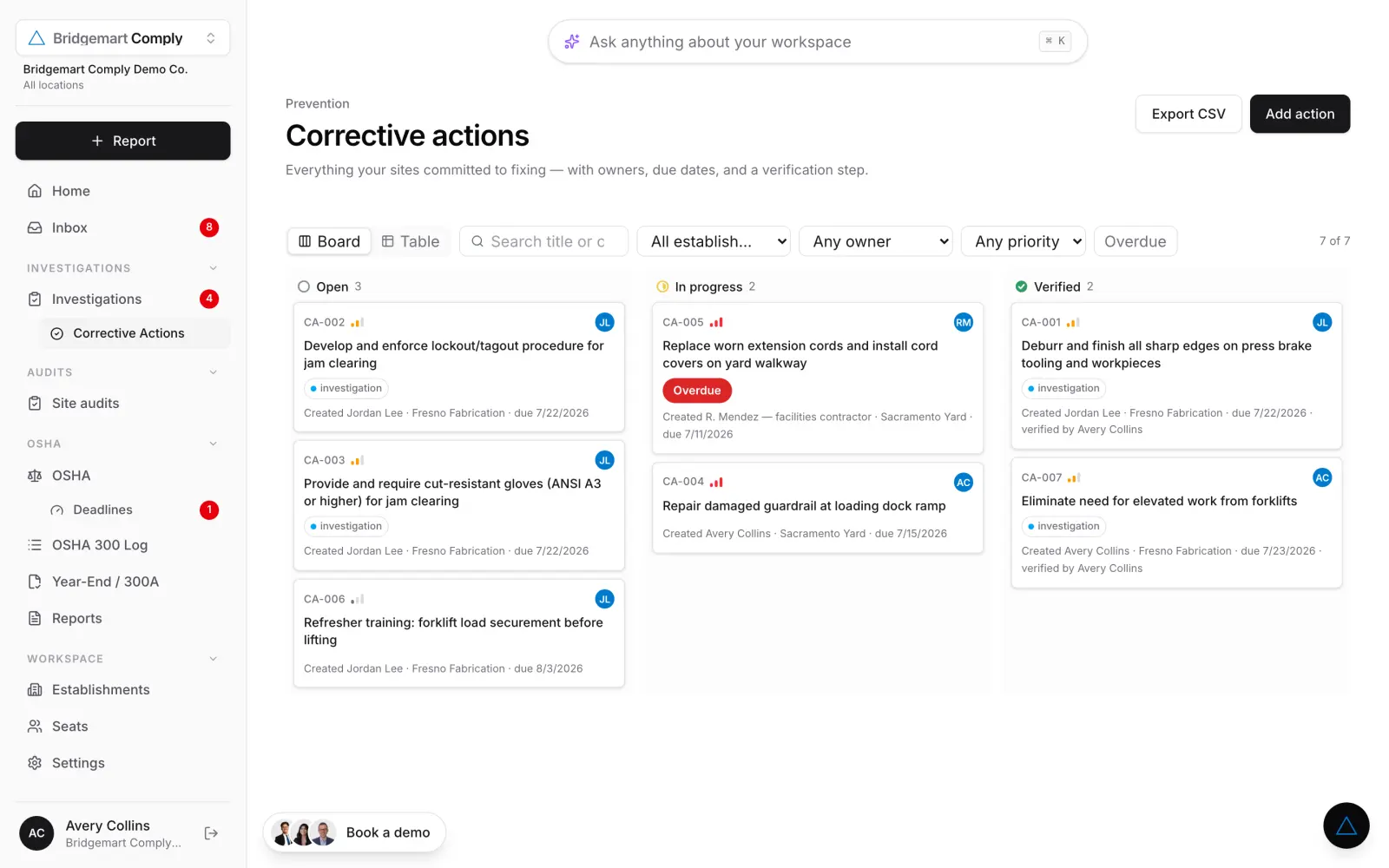
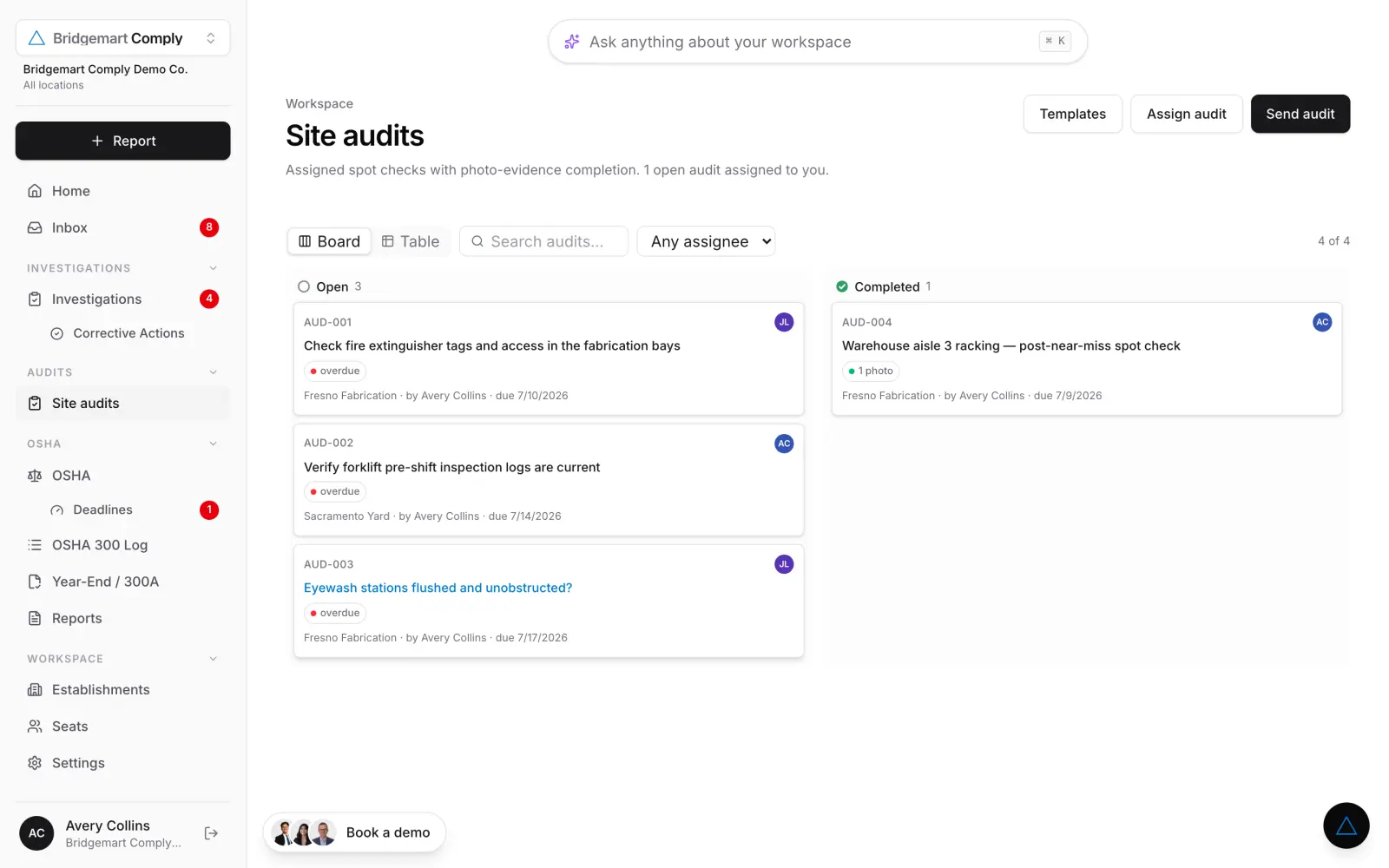
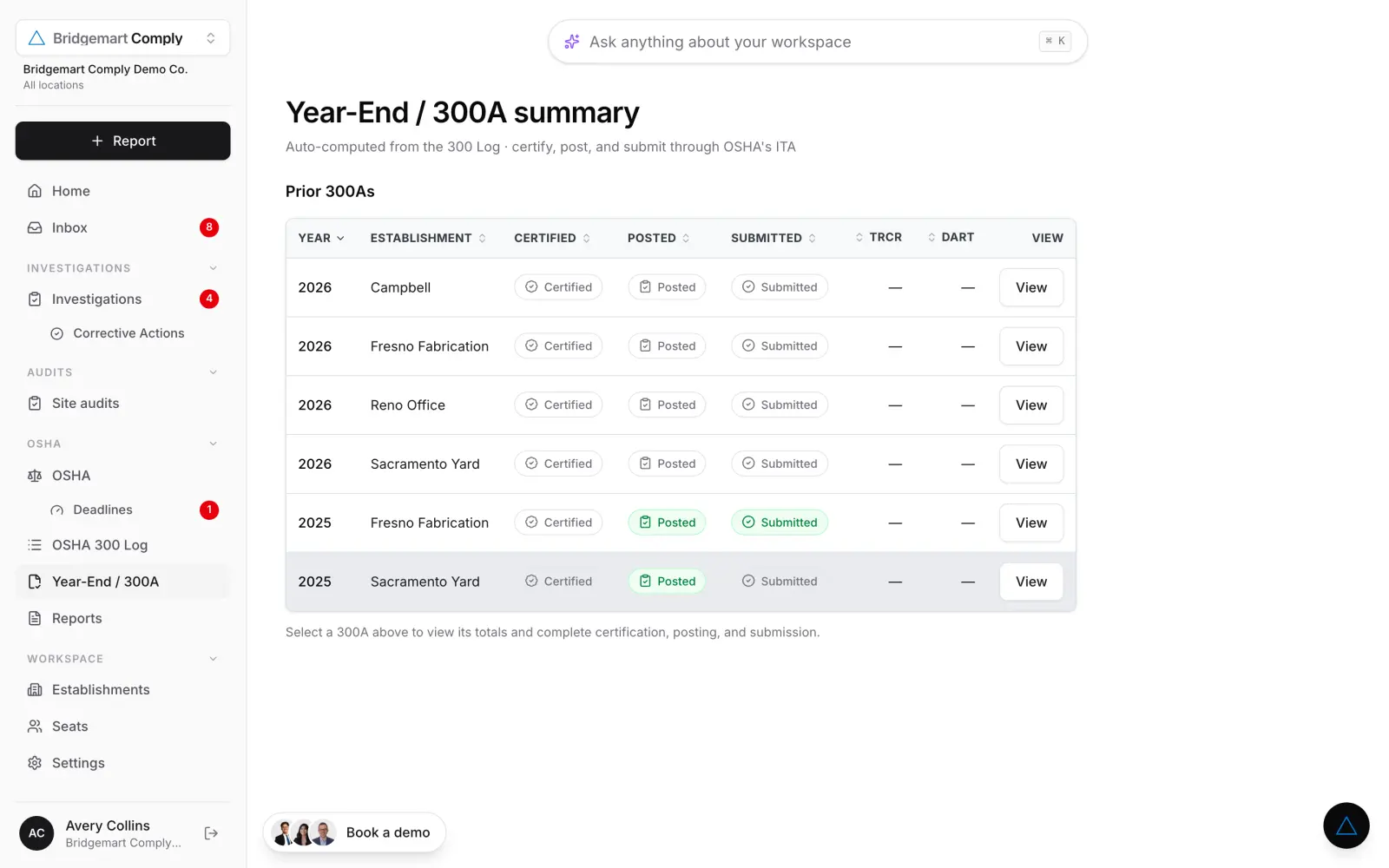
The log builds itself
Every accepted report lands on the 300 Log as a case — classification, days away, restrictions. Import the log you already keep as CSV, export to Excel whenever an inspector asks.
A binder, plus a spreadsheet rebuilt every December
One log that is already current, per establishment
The real cost
Paper doesn’t just waste time.
It hides the pattern.
Every report that gets printed, scanned, and emailed is a data point that leaves the system. Three lower-back strains on one line in six weeks look like three bad days in three folders — and like a root cause in one.
Comply keeps every report structured from the moment it’s filed. So the fourth one never happens.
Lower-back strain · Line 3
Trailing 12 weeksPattern detected — three lower-back strains on Line 3 in six weeks, all during manual pallet transfer. Recommended control: mechanical lift assist (engineering, above PPE).
How it works
One pipeline, end to end
Intake
It comes in from anywhere
QR posters, kiosks, web, mobile. No login, no form to photocopy — every submission lands in one queue, already tagged to the right site.
AI review
AI reads it before you do
Classified against 29 CFR 1904 with the criterion cited and a confidence score. Severe-injury clocks start themselves.
Route
Your manager makes one decision
Investigate it, or put it on the log. Confirm the AI or override it — either way the reasoning is recorded.
Done
The rest runs itself
Corrective actions drive to verified. The 300, 300A and 301 build and validate themselves. Every record feeds the trend line.
What it replaces
Five manual processes.One system of record.Driven with AI.
Reporting
Paper forms, texts, hallway mentions
One queue, every channel
A QR code on the floor. Anyone reports in under a minute — no account, no app, no training. AI asks the follow-ups that capture what OSHA needs.
Investigations
A blank Word doc and a scanner
A draft to react to
The AI has already read the narrative and the photos, walked the 5-whys, and written the summary. Your manager edits and signs.
Corrective actions
Chased over email until forgotten
Owned, dated, verified
Every fix gets an owner, a due date, and a place in the hierarchy of controls. Completion and verification are separate signatures.
OSHA logs
Re-keyed into 300, 300A and 301 each February
Built all year, validated at the end
Confirmed cases land on the 300 Log the moment they’re classified. Year-end is a checklist, not a two-week spreadsheet project.
Audits
A clipboard, then a binder
Assigned, photo-proofed, logged
Spot-checks go out on a cadence, come back with photo evidence, and get chased when they’re late.
See it on your own records
Bring the messiest month
you’ve got.
Send us a sample — a few reports, last year’s 300 Log, the binder photos, whatever exists. Tommy comes back with those same records inside Comply: classified, on the log, with the corrective actions already tracked.
- A walkthrough built on your data, not a canned demo
- A read on which of your cases are actually recordable
- A quote for your establishment count — no seat math on a call

Tommy Hanly reads every one of these — it doesn’t go to a queue.
Get the walkthrough
Start with your work email. Or skip straight to the calendar.
Multi-site
Dozens of sites.
One account.
Add an establishment and its calendar takes care of itself — the forms it owes, the state rules that apply, what’s due next. HQ sees everything; site managers see their own.
- Per-site 300A and filing calendar, auto-tracked
- Federal and state-plan rules applied per location
- Company-wide TRIR & DART rollups
- Scoped access for site managers and reporters
The invoice you’re already paying
Time is money. You’re spending both on paperwork.
Here’s what manual safety management bills a typical three-site team — every single year.
Statement · EHS admin, rendered annually
The math isn’t close.
Get a quote for your sites →Estimates: three establishments, ~25 cases/yr, $65/hr loaded EHS cost. Penalty figures are OSHA’s current adjusted civil maximums per violation.
Before you book
The questions we get first
Does Comply actually file the 300A, or just print it?
The 300A is auto-computed from your 300 Log per establishment, then walked through the real steps — certify, post, and submit through OSHA’s ITA — with TRIR and DART rolled up alongside it. Prior years stay in the same place, so an inspection is a lookup instead of a search.
We already keep a log. Can we bring it over?
Yes — import your existing log as CSV, and export back to Excel whenever you need to hand something over. You are not locked in, and you do not start the year from zero.
We have sites in state-plan states. Does that work?
Add an establishment and Comply applies the federal and state-plan rules for that location, with its own filing calendar and deadlines. HQ sees the whole portfolio; a site manager sees their site.
Who decides whether a case is recordable — us or the AI?
You do. Rally drafts the classification with its reasoning and flags what it is unsure about, but a person confirms, and any change to the 300 Log always requires that confirmation. Every action is checked against the asker’s role and written to the audit trail.
Injury records are sensitive. Who can see what?
Access is scoped by role — reporters file, site managers see their own establishment, HQ sees the rollup. Privacy-concern cases are handled as privacy cases on the log, and every read-and-write lands in the audit trail.
What does the demo actually involve?
Fifteen minutes on a sample of your own records — a few reports, last year’s log, binder photos, whatever exists. No slides, no credit card, no contract. You leave knowing which of your cases were misclassified either way.
Something else? Ask Tommy directly →
Make this your last paper year
Fifteen minutes with Tommy, on a sample of your own records — all five processes in one place, and whatever the pile has been hiding.
Tommy Hanly
Bridgemart Comply
Request more info or go straight to the calendar.